
PixiJS v8WebGL2TypeScriptMIT
Smooth, anti-aliased graphics
for PixiJS v8, smooth as silk.
pixi-silk draws each PixiJS shape as an exact signed distance field. Every edge is anti-aliased per pixel, so it stays smooth at any zoom, rotation and pixel ratio. No MSAA, no triangles, one draw call per object. Squircles, arcs, smooth lines, dashes, OKLab gradients and glows are included.
What is pixi-silk?
pixi-silk is an open-source TypeScript library that adds smooth, anti-aliased vector graphicsto PixiJS v8. Its SilkGraphics object has the same shape, fill and stroke API as Pixi's Graphics. It does not cut shapes into triangles. For every pixel, it computes the exact signed distance to the shape and turns it into coverage over one device pixel. This isanalytic anti-aliasing. It is exact at any scale, in filters and render textures, and on retina screens with fractional pixel ratios.
- draw call per SilkGraphics
- 1
- draw call per SilkGraphics
- canvas to device pixels
- 1:1
- canvas to device pixels
- dithered gradient ramps
- 16-bit
- dithered gradient ramps
- MSAA, filters or extra passes
- 0
- MSAA, filters or extra passes
Graphics-like API, per-pixel precision
SilkGraphics reads like Pixi'sGraphics: add shapes to the path, then fill or stroke them. Each primitive is one instanced quad. Its fragment shader computes the exact distance to the shape for every pixel.
- Works for UI, charts, icons and widgets
- Clearing and redrawing every frame is cheap
- Every guide has live demos with their source
Source src/demos/quick-start.demo.ts
import { conic, SilkGraphics, vertical } from 'pixi-silk';
import { defineDemo } from './runtime';

const GAUGE = conic([0x30d158, 0xffd60a, 0xff453a]);
const FILL = vertical(
    [
        [0, 0xff9f0a, 0.8],
        [1, 0xff9f0a, 0],
    ],
    { easing: 'smooth' },
);

export default defineDemo({
    size: [360, 160],
    controls: {
        progress: { type: 'range', label: 'progress', min: 0, max: 1, step: 0.01, value: 0.72 },
    },
    setup({ stage, params, tick }) {
        const g = new SilkGraphics();

        stage.addChild(g);
        tick((t) => {
            const wave = [120, 100, 170, 80, 220, 92, 270, 60, 320, 70].map((v, i) =>
                i % 2 ? v + Math.sin(t + i) * 6 : v,
            );

            g.clear();
            g.roundRect(10, 10, 340, 140, 22, 0.6).fill(0x1c1c1e); // squircle card
            g.arcSweep(80, 80, 44, -Math.PI / 2, Math.PI * 2).stroke({ width: 12, color: 0x2c2c2e });
            g.arcSweep(80, 80, 44, -Math.PI / 2, Math.PI * 2 * params.progress).stroke({
                width: 12,
                cap: 'round',
                gradient: GAUGE,
            }); // gauge follows the arc
            g.area(wave, 130, { smooth: 'monotone' })
                .fill(FILL) // chart fill ...
                .stroke({ width: 2, color: 0xff9f0a, cap: 'round' }); // ... and its top line
        });
    },
});
Everything is smooth
Each pixel gets its coverage from the exact distance to the shape. Smooth at any zoom, rotation and DPR, in filters and render textures too.
Each SilkGraphics is one instanced draw call. Rebuilding 50,000 primitives takes about 12 ms of CPU per frame.
Smooth squircle corners, per-corner radii, arcs, donut sectors, hearts, stars, rounded triangles and chart areas.
Linear, radial, conic and along-the-path gradients. Mixed in OKLab, stored as half floats and dithered, so they do not band.
Blur any fill or stroke. Neon glows, drop shadows and motion blur cost no filter and no extra pass.
Dashes and dots with caps, drawn in the shader. Closed outlines have no seam. Strokes can taper along the path.
createSilkApp maps canvas pixels 1:1 to device pixels, even at 1.5x or 2.625x, and follows DPR changes.
Pointer events test the real shape. Rings are hollow and a line only reacts on its stroke.
Source src/demos/versus.demo.ts
import { Container, Graphics, Text } from 'pixi.js';
import { SilkGraphics } from 'pixi-silk';
import { defineDemo } from './runtime';

// Left: Pixi v8 Graphics (tessellated, no MSAA). Right: SilkGraphics (distance fields).
export default defineDemo({
    size: [480, 240],
    controls: {
        zoom: { type: 'range', label: 'zoom', min: 1, max: 6, step: 0.01, value: 1 },
        spin: { type: 'toggle', label: 'rotate', value: true },
    },
    setup({ stage, params, tick }) {
        const sides = [new Container(), new Container()];
        const pixi = new Graphics();
        const silk = new SilkGraphics();

        sides[0].addChild(pixi);
        sides[1].addChild(silk);
        sides.forEach((side, i) => {
            const mask = new Graphics().rect(i * 240, 0, 240, 240).fill(0xffffff);
            const label = new Text({
                text: i ? 'SilkGraphics' : 'Graphics',
                style: { fill: 0x8e8e93, fontSize: 12, fontFamily: 'system-ui' },
            });

            label.position.set(i * 240 + 12, 10);
            side.mask = mask;
            stage.addChild(side, mask, label);
        });
        let angle = 0;

        tick((_t, dt) => {
            if (params.spin) angle += dt * 0.15;
            for (const [i, side] of sides.entries()) {
                side.pivot.set(120, 130);
                side.position.set(i * 240 + 120, 130);
                side.scale.set(params.zoom);
                side.rotation = angle;
            }
            for (const g of [pixi, silk]) {
                g.clear();
                g.circle(120, 130, 62).stroke({ width: 3, color: 0x64d2ff });
                g.roundRect(70, 90, 100, 80, 24).stroke({ width: 1, color: 0xffffff });
                g.circle(120, 130, 18).fill(0xff375f);
                for (let k = 0; k < 6; k++)
                    g.moveTo(40, 60 + k * 3)
                        .lineTo(200, 64 + k * 5)
                        .stroke({ width: 0.6, color: 0xffd60a });
            }
        });
    },
});
Why v8 stopped looking smooth
PixiJS v8 turns Graphics into triangles once, when you draw. Scale it up and curves show facets. Thin lines crawl between pixel rows. Anti-aliasing is MSAA on the main canvas only: filters and render textures stay aliased unless you opt each one in, and filters render at resolution 1. Silk computes coverage per pixel, so none of this applies.
Rebuilt pixel for pixel
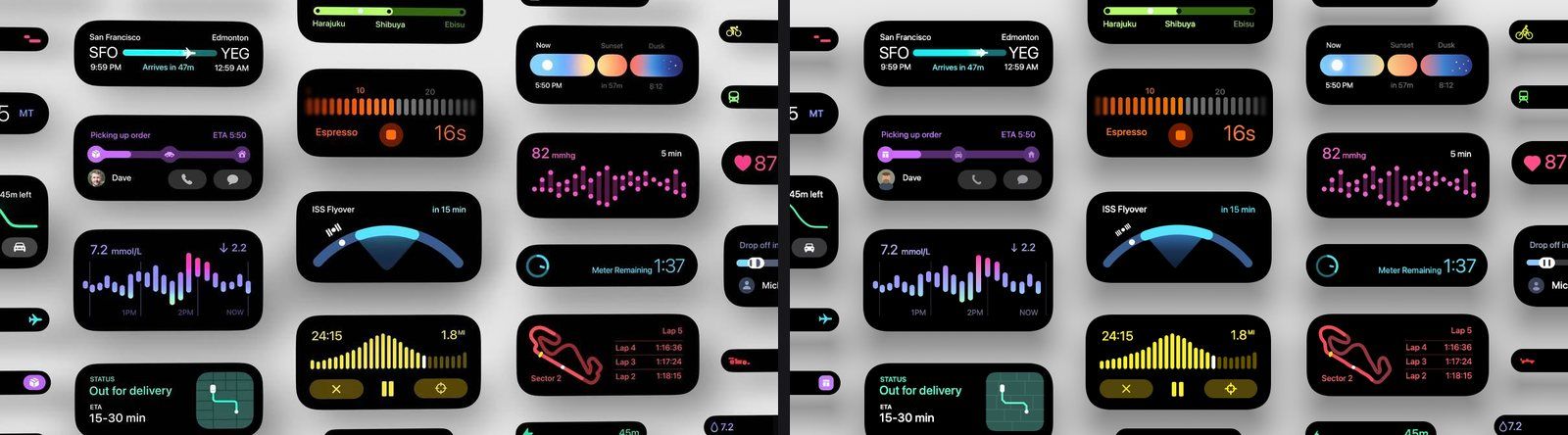
All five sheetsFive design reference sheets and 81 widgets, measured against the originals. Left is the reference, right is the live render.
Questions
How do I enable anti-aliasing in PixiJS v8?
Pass antialias: true to app.init() for MSAA on the main canvas. For sharp output on retina screens, add resolution: window.devicePixelRatio. Set autoDensity: true too. MSAA uses four samples per pixel. It skips filters and render textures unless you opt them in. For exact anti-aliasing everywhere, draw vector shapes with SilkGraphics from pixi-silk and keep antialias: false.
Why do PixiJS v8 Graphics look jagged or blurry?
PixiJS v8 tessellates Graphics into triangles when you draw, and only MSAA (antialias: true) anti-aliases them. Scaled curves show facets, and thin lines crawl between pixels. Filters and render textures stay aliased unless you opt them into MSAA. Filters default to resolution 1, which blurs them on retina screens. pixi-silk replaces the triangles with exact per-pixel distance fields.
What is pixi-silk?
pixi-silk is an MIT-licensed TypeScript library for PixiJS v8. Its SilkGraphics display object has a Graphics-like API. It draws rects, squircles, circles, arcs, lines, paths, areas and more as signed distance fields with analytic anti-aliasing. You also get OKLab gradients, glows, dashes and a DPR-exact app helper, createSilkApp.
What is analytic anti-aliasing?
Analytic anti-aliasing computes each edge pixel's coverage exactly from the shape's geometry, not from a few samples. For each pixel, pixi-silk divides the signed distance to the shape by the size of one device pixel. Edges stay smooth and exact at any zoom, rotation and resolution.
MSAA or SDF anti-aliasing: which is better for 2D graphics?
SDF (signed distance field) anti-aliasing is better for vector UI, charts and icons. It gives continuous coverage, not MSAA's five levels per pixel. It handles hairlines and zoom, and works inside filters and render textures without extra memory. MSAA is simpler for arbitrary triangle meshes.