Anti-aliasing compared
MSAA, resolution, curve smoothness, supersampling, FXAA, @pixi/graphics-smooth and analytic SDF anti-aliasing in PixiJS v8, compared, with fixes by symptom.
Updated pixi-silk 1.0.1View as Markdown
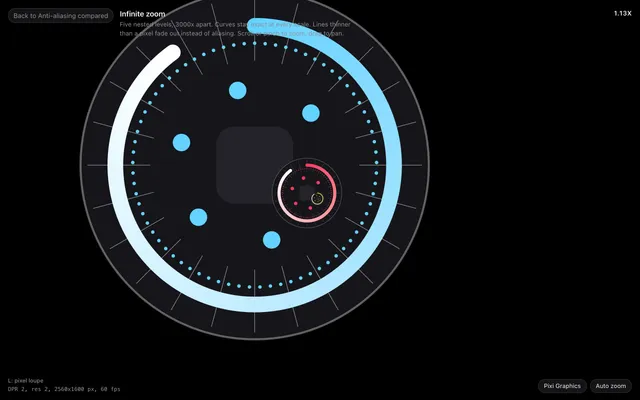
Anti-aliasing gives each edge pixel a partial colour, in proportion to how much of it the shape covers. PixiJS v8 offers five ways to get there. pixi-silk adds a sixth: it computes coverage from each shape’s exact signed distance, per pixel. That is what the rest of the docs mean when they say an edge stays sharp at any zoom, rotation and device pixel ratio.
The options at a glance#
| Technique | How to turn it on in PixiJS v8 | Edge quality | Cost | Applies to |
|---|---|---|---|---|
| MSAA | app.init({ antialias: true }) | 4 samples, so 5 coverage levels per edge pixel | memory bandwidth, a resolve pass | the main canvas. Render textures and filters opt in |
| Higher resolution | resolution: devicePixelRatio, autoDensity: true | smaller stairs, still aliased | fill rate grows with DPR squared | everything |
| Curve smoothness | app.init({ bezierSmoothness: 0.9 }) | fewer facets on curves, edges still aliased | more triangles | Graphics curves |
| Supersampling | draw into a 2x render texture, then draw it scaled down | high | 4x the pixels and an extra texture | what you draw into it |
| FXAA | a post-process filter | softer edges, blurred detail and text | one full-screen pass | the filtered object |
| Analytic SDF (pixi-silk) | new SilkGraphics() | exact coverage, continuous | one instanced draw call per object | everywhere, filters and render textures included |
MSAA in PixiJS v8#
import { Application } from 'pixi.js';

const app = new Application();

await app.init({
    antialias: true, // MSAA on the main canvas
    resolution: window.devicePixelRatio,
    autoDensity: true,
});
MSAA belongs to a render target, so it does not follow your objects. Render textures are not
multisampled unless you create them with antialias: true. Filters render into their own targets
without MSAA and at resolution 1, unless you change both.
MSAA works for large shapes at rest. UI and charts show where it stops:
- Slowly moving or rotating edges jump between the five coverage levels, which reads as shimmer.
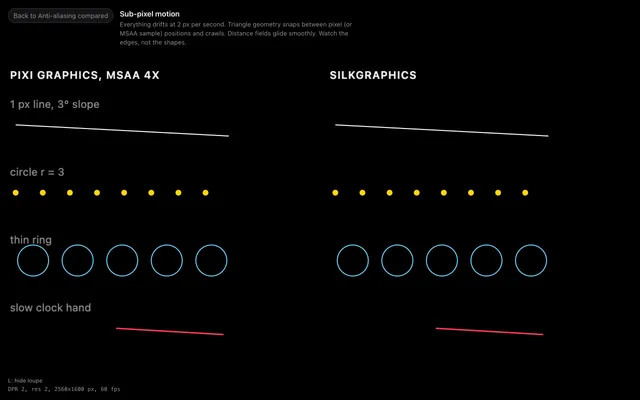
- Lines thinner than a pixel fall between the four samples and look dotted.
- Zooming in shows the facets of curves, because Graphics fixed its triangles when you drew them.
Analytic anti-aliasing#
A signed distance field gives the distance from any point to the shape’s edge. pixi-silk evaluates each primitive’s exact distance per pixel and turns it into coverage over one device pixel:
float px = sqrt(abs(dFdx(p).x * dFdy(p).y - dFdx(p).y * dFdy(p).x)); // one device pixel, in shape units
float coverage = clamp(0.5 - d / px, 0.0, 1.0); // d: signed distance to the edge
The pixel size comes from screen-space derivatives. So the result holds at any scale, rotation,
resolution and render target, with nothing to tessellate and no samples to miss. Each
SilkGraphics draws all its primitives in one instanced call. How it works
follows the shader step by step.
import { createSilkApp, SilkGraphics } from 'pixi-silk';

const { app } = await createSilkApp({ parent: document.body });
const g = new SilkGraphics();

g.circle(200, 150, 80).stroke({ width: 2, color: 0x64d2ff });
g.roundRect(100, 60, 200, 180, 40, 0.6).stroke({ width: 0.5, color: 0xffffff });
app.stage.addChild(g);
The circle is exact at any zoom. The half-pixel stroke is drawn one pixel wide at half the alpha,
so it never breaks up. createSilkApp keeps MSAA off, because it would only cost bandwidth.
Analytic anti-aliasing has limits too. It applies to what SilkGraphics draws, not to sprites or
Pixi Graphics. GPU cost follows covered area, so a large blurred shape costs more than many small
ones.
Fix a symptom#
Most of these fixes work with plain Graphics. The last column is the pixi-silk route.
| You see | Cause | Fix in PixiJS | With pixi-silk |
|---|---|---|---|
| Jagged, stair-stepped edges | antialias is false by default | app.init({ antialias: true }) | SilkGraphics computes coverage itself |
| Circles look like polygons when zoomed | Graphics cuts curves into segments when you draw | raise bezierSmoothness, or redraw at the final scale | curves are evaluated per pixel |
| Thin lines flicker, look dotted or vanish | a sub-pixel line covers a fraction of each pixel, and samples miss it | keep strokes at least one device pixel wide | hairlines fade instead of thinning. See strokes and dashes |
| Everything is a little blurry on retina screens | the canvas has fewer pixels than the screen, or was rounded at a fractional DPR | resolution: devicePixelRatio, autoDensity: true | createSilkApp maps canvas pixels 1:1. See resolution |
| Content behind a filter is blurry | filters render at resolution 1 | Filter.defaultOptions.resolution = 'inherit' | createSilkApp sets it for you |
| Gradients show bands | 8-bit colour, with no dither in FillGradient | none built in | half-float ramps, OKLab and dither. See gradients |
| Slow motion snaps from pixel to pixel | roundPixels: true | keep roundPixels: false | the default in createSilkApp |
@pixi/graphics-smooth on PixiJS v8#
@pixi/graphics-smooth is the community
plugin that made v7 Graphics smooth. Its SmoothGraphics class anti-aliases in the shader,
without MSAA. Its 1.1 line requires PixiJS 7.2 or a newer v7, and as of September 2026 there is no
v8 release on npm. On v8, SilkGraphics fills that role with a v8-style API.
// PixiJS v7 + @pixi/graphics-smooth
const g = new SmoothGraphics();
g.lineStyle({ width: 2, color: 0xffffff });
g.beginFill(0x1c1c1e);
g.drawRoundedRect(0, 0, 200, 80, 16);
g.endFill();
g.drawCircle(40, 40, 12);
// PixiJS v8 + pixi-silk
const g = new SilkGraphics();
g.roundRect(0, 0, 200, 80, 16).fill(0x1c1c1e).stroke({ width: 2, color: 0xffffff });
g.circle(40, 40, 12).stroke({ width: 2, color: 0xffffff });| v7 call | SilkGraphics |
|---|---|
beginFill(c, a) to endFill() | shape().fill({ color: c, alpha: a }) |
lineStyle({ width, color, alpha }) | shape().stroke({ width, color, alpha }) |
drawRect, drawRoundedRect, drawCircle, drawEllipse | rect, roundRect, circle, ellipse |
moveTo, lineTo, bezierCurveTo | the same, then fill() or stroke() |
arc(...) | arc(...), which starts its own subpath, or arcSweep(...) |
LINE_SCALE_MODE.NONE | not built in. Divide the width by the scale |
PixiJS v8 changed the Graphics API itself. The PixiJS v8 migration guide
covers the upgrade, and migrating from Graphics covers how v8
Graphics and SilkGraphics differ.
Which one to use#
For sprites and textures only, skip MSAA. The GPU filters textures already.
For a few large shapes and no zoom, antialias: true with resolution: devicePixelRatio is
enough.
For UI, charts, icons, thin lines and vector content that zooms or rotates, use SilkGraphics and
keep antialias: false. The same holds for content behind filters or in render textures.
The infinite zoom and sub-pixel motion experiments at the end of this page show the difference full screen.
References#
- PixiJS v8 Graphics API and the issue on smoother curves in v8.
- Inigo Quilez, 2D distance functions.
- web.dev, pixel-perfect rendering with devicePixelContentBox.
- Glossary: MSAA, SSAA, FXAA and signed distance field.
API reference: SilkGraphics, createSilkApp
Experiments on this page
Full-screen scenes. Each one also opens in Studio with its source.